Lena Burdick

I am a data-driven professional who is interested in projects that combine mathematical analysis with creative design.
Here, I hope to highlight some of my projects.
View My LinkedIn Profile
View My Upwork Profile
Data Collection Methods
Various methods were used to collect data for this project. Not all data is present in all locations (Excel, Airtable, and Tableau).
Gathering Episode Information
An online tool was used to convert Wikipedia tables into .csv files. This gave us the initial information about episode titles, dates, writers, directors, and viewers. These .csv files were then merged into one dataset in Excel.
Online Tool: WikiTable2CSV
Example:
Show: 30 Rock
Wikipedia Page: List of 30 Rock Episodes
CSV Output: 30 Rock S1
The process was repeated to gather general information on show seasons such as the rank, timeslot, and average viewers. These .csv files were then added as individual sheets in the Excel document.
Example:
Show: 30 Rock
Wikipedia Page: 30 Rock
CSV Output: 30 Rock S1
Information on airtime in “Episode List” was filled in manually based on the season’s timeslot information (from .csv file below). Discrepancies were cross-check with a daily TV schedule. Information on TV Season (ex. 2008-2009) in “Episode List” was filled in using an INDIRECT VLOOKUP formula that checked the “Season Info” sheets in the Excel document.
Other minor steps were taken to ensure consistency of the data. More information can be found in the Excel Document itself.
Converting Data to Relational Database
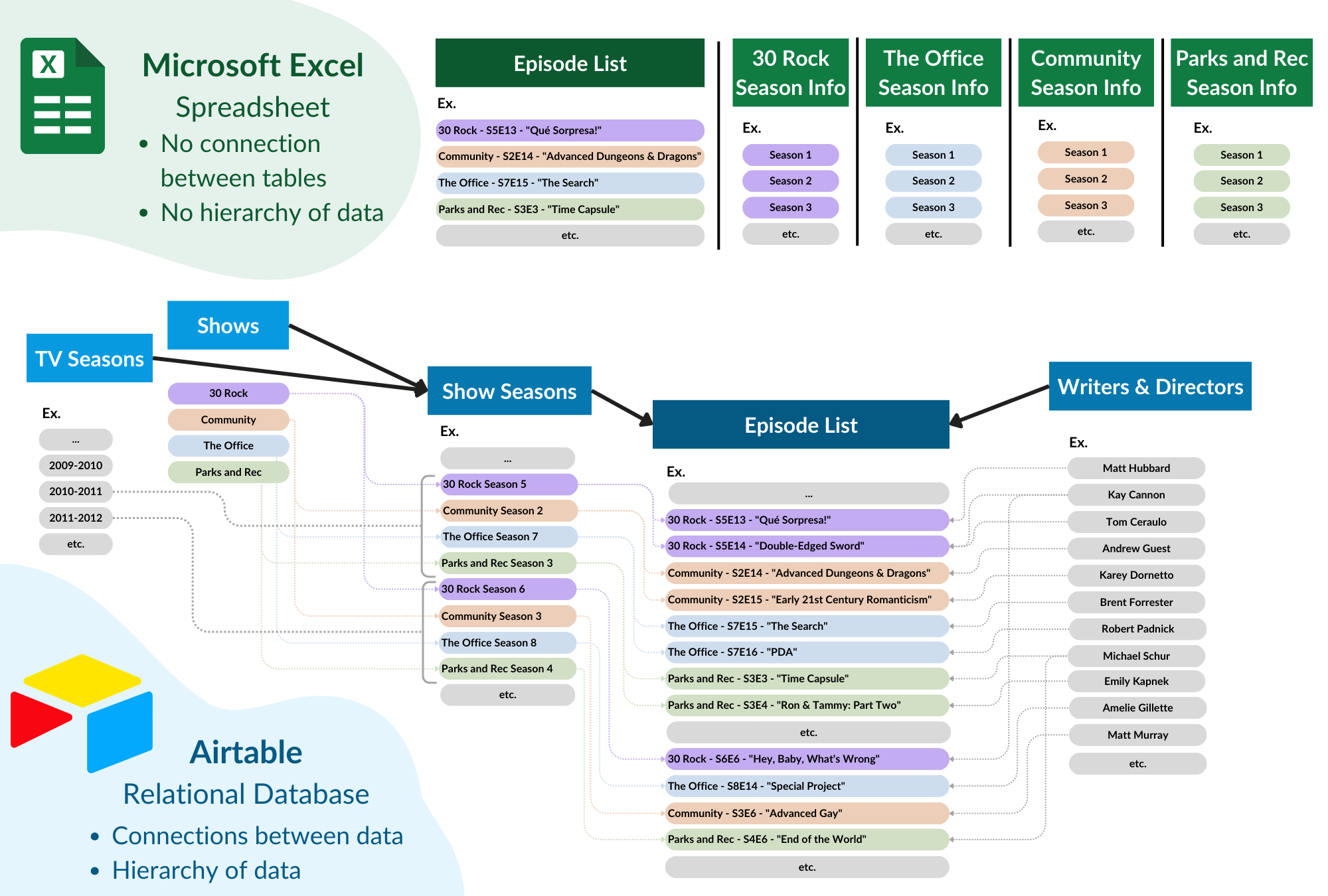
When importing the Excel workbook into Airtable, the data had to be adjusted to the form of a relational database.
Creating a Relational Database
- The “Episode List” sheet was imported as-is
- A new table “Shows” was creating, with an entry for each of the 4 shows
- A new table “Show Seasons” was created, and the data from all four “Season Info” Excel sheets was merged into this table.
- The columns “Season Title” and “Show” in the table “Episode List” were converted into linked fields, which automatically connected all three tables.
- More information was added such as Wikipedia links and a tabkle for writers/directors– you can find more information on these steps in the sections below.
Excel and Airtable Schema Differences
Finding Episode Wikipedia Pages
Pages for individual shows and show seasons were added manually, as were the DVD covers and show logos. However, for individual episodes, a Python script was used to extract links from show Wikipedia pages.
Python Script:
import requests
from bs4 import BeautifulSoup
import pandas as pd
import os

def get_episode_links(tv_show_name, wikipedia_url, save_path):
    """
    Scrapes individual episode titles and their Wikipedia links from a show's episode list page.
    Saves the results as a CSV file.
    """
    headers = {
        "User-Agent": "Mozilla/5.0 (Windows NT 10.0; Win64; x64) AppleWebKit/537.36 (KHTML, like Gecko) Chrome/91.0.4472.124 Safari/537.36"
    }

    response = requests.get(wikipedia_url, headers=headers)

    if response.status_code != 200:
        print(f"Failed to retrieve page: {response.status_code}")
        return None

    soup = BeautifulSoup(response.text, 'html.parser')

    # Find all tables that contain episode information
    tables = soup.find_all('table', class_='wikitable')

    if not tables:
        print("No episode tables found. The structure may be different for this page.")
        return None

    episode_data = []

    # Loop through tables (Wikipedia often has multiple season tables)
    for table in tables:
        for row in table.find_all('tr'):
            columns = row.find_all('td')

            if columns:
                # Try to find episode title link
                episode_link = row.find('a', href=True)

                if episode_link:
                    episode_title = episode_link.text.strip()
                    episode_url = "https://en.wikipedia.org" + episode_link['href']

                    episode_data.append({"Title": episode_title, "Wikipedia Link": episode_url})

    if episode_data:
        # Format the filename and save path
        filename = f"{tv_show_name.replace(' ', '_')}_Episodes-Wiki_Scrape.csv"
        full_path = os.path.join(save_path, filename)

        # Save to CSV
        df = pd.DataFrame(episode_data)
        df.to_csv(full_path, index=False)

        print(f"Episode links saved to: {full_path}")
    else:
        print("No episode links found. The page structure may be different.")

#  Example Usage
tv_show_name = "Community"  # Change this to the show's name
wikipedia_episode_list_url = "https://en.wikipedia.org/wiki/List_of_Community_episodes" # Change this to the show's Wikipedia page that contains a list of episodes
save_directory = "/Users/SampleDirectory/NBCFolder" # Change this to your directory

# Run the scraper
get_episode_links(tv_show_name, wikipedia_episode_list_url, save_directory)
The resulting data was slightly messy because the page formatting was not the same across each Wikipedia page. Thus, the following steps were taken to match the data with the data present in Airtable:
Merging Data:
- Both Airtable and .csv data was sorted by episode title
- Discrepancies in .csv data were identified (not all episodes of every show had a Wikipedia page)
- Data was copy and pasted in chunks (chunks were broken at discrepancy points) into Airtable
- Episodes with missing Wikipedia pages were spot-checked to ensure the pages actually did not exist.
- When applicable, missing Wikipedia links were substituted for fandom Wiki links manually (for example: The Office - S5E4 - “Baby Shower”). This process was not fully completed and is a goal for the future.
Seperating Writers & Directors
My early Wikipedia data in Excel gave me information on the writers and directors of each episode. I wanted to keep a seperate table in Airtable for these individuals; however, it was not as easy as converting to a linked field (as I did for “Show” and “Season Title”). This is because many episodes have multiple directors and writers listed, so I had to find a work-around.
Creating Writer/Director Table
- Created formula fields that took the data from “Written By” and “Directed By” and converted any “&” symbol to a “,”. Ex. “Tina Fey & Matt Hubbard” –> “Tina Fey, Matt Hubbard”
- Duplicated these formula fields and converted them to multi-select fields. Airtable determines how data is split when converted to a multi-select field the same way as a linked field, so this was an easy way to identify future issues.
- The table was sorted alphabetically by the new multi-select field. Some problems, like minor name variations and splitting issues were identified and then fixed.
- Created a new table called “Writer’s/Directors”
- Converted the multi-select field into a linked field, which auto-populated the “Writer’s/Directors” table and created the links.
Finding Writer/Director IMDBs, Wikipedias, and Headshots.
Again, a Python script was used to find Wikipedia links and headshots (when available) for each writer/director.
I downloaded a .csv file of all the writers/directors from Airtable. Then, I ran the following script to scrape the IMDB and Wikipedia pages.
Python Script:
import requests
from bs4 import BeautifulSoup
import pandas as pd
import time

def get_wikipedia_info(person_name):
    """
    Searches Wikipedia for a person and extracts:
    - Wikipedia Page Link
    - Headshot Image URL (if available)
    """
    search_url = f"https://en.wikipedia.org/w/api.php?action=query&format=json&list=search&srsearch={person_name.replace(' ', '+')}"

    response = requests.get(search_url)
    if response.status_code != 200:
        return "Not Found", "Not Found"

    data = response.json()
    search_results = data.get("query", {}).get("search", [])

    if search_results:
        wikipedia_page_title = search_results[0]["title"]
        wikipedia_url = f"https://en.wikipedia.org/wiki/{wikipedia_page_title.replace(' ', '_')}"

        # Try extracting headshot image
        image_url = get_wikipedia_headshot(wikipedia_page_title)

        return wikipedia_url, image_url

    return "Not Found", "Not Found"

def get_wikipedia_headshot(page_title):
    """
    Extracts the lead image (headshot) from a Wikipedia page.
    """
    media_url = f"https://en.wikipedia.org/w/api.php?action=query&format=json&prop=pageimages&pithumbsize=500&titles={page_title}"

    response = requests.get(media_url)
    if response.status_code != 200:
        return "Not Found"

    data = response.json()
    pages = data.get("query", {}).get("pages", {})

    for page_id, page_info in pages.items():
        if "thumbnail" in page_info:
            return page_info["thumbnail"]["source"]

    return "Not Found"

# Load CSV file
csv_file = "/SampleFilePath/NBC_WritersDirectors.csv" # Change this to your actual file path  # Change this to your actual file path
df = pd.read_csv(csv_file, dtype=str)

# Ensure all relevant columns exist and are in string format
for col in ["Wikipedia Link", "Wikipedia Headshot"]:
    if col not in df.columns:
        df[col] = ""
    df[col] = df[col].astype(str)

# Process first 5 names for testing
for index, row in df.iterrows():
    person_name = row["Name"]
    print(f"Processing: {person_name}")

    # Get Wikipedia info (Link & Headshot)
wikipedia_link, wikipedia_headshot = get_wikipedia_info(person_name)
    time.sleep(2)  # Pause to avoid excessive requests

    # Update DataFrame
    df.at[index, "Wikipedia Link"] = wikipedia_link
    df.at[index, "Wikipedia Headshot"] = wikipedia_headshot

# Save updated CSV
output_file = "/SampleFilePath/NBC_WritersDirectors.csv" # Change this to your actual file path
df.to_csv(output_file, index=False)
print(f"\n✅ Data saved to {output_file}")
Example
This script uses Wikipedia’s API to search based on name, then return the first result. Because of this, some of the links returned are not correct. For instance, a writer without their own Wikipedia page may appear by name in the Wikipedia page for a project they worked on. In this case, the script would return that link, since it is the first search result. Obviously incorrect data was removed from the set, and the remaining data was spot-checked.
A future goal of this project is to find IMDB links and headshots for each writer/director. However, IMDB does not allow data scraping, and I had trouble getting a Python script to work correctly.